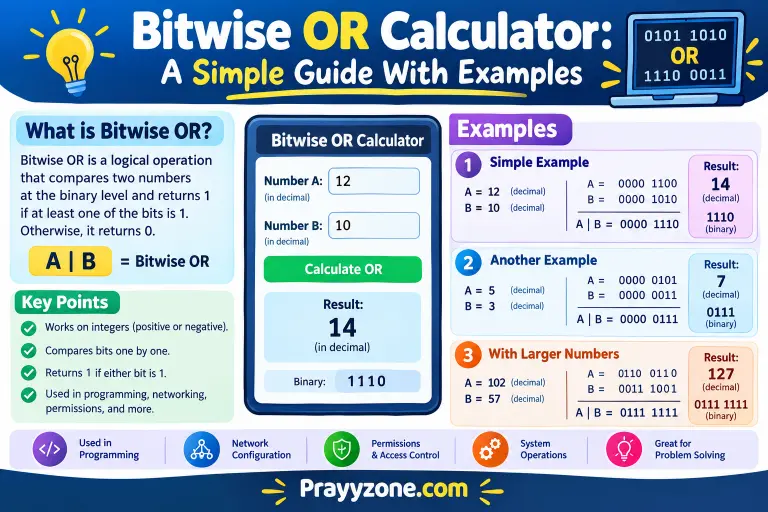
”A bitwise OR calculator performs the OR operation on two or more numbers by comparing their binary bits. Each bit is set to 1 if at least one corresponding input bit is 1; otherwise, it remains 0. For example, 5 OR 3 = 7, because 5 is 101, 3 is 011, and the result is 111 in binary.”
A bitwise or calculator can make computer math much easier. If you work with binary numbers, programming, computer science, or digital logic, you may need to compare numbers one bit at a time. Doing this by hand can be slow and may lead to mistakes. A bitwise OR calculator gives you the result quickly.
People search for “bitwise or calculator” because they want to calculate the OR operation between two numbers. They may also want to understand the difference between bitwise OR, logical OR, AND, and XOR. The main idea is simple: bitwise OR compares matching bits. If either bit is 1, the result is 1. Only two zero bits produce a zero.
For example, 5 in binary is 0101, while 3 is 0011. When we apply OR, the result is 0111, which equals 7. Online calculators can often accept decimal, binary, hexadecimal, or octal values and show the answer in several formats.
Bitwise OR Calculator – Quick Answer
A bitwise OR calculator calculates the OR operation between two binary values.
The common symbol for bitwise OR is:
|
The basic rules are:
| Bit A | Bit B | A OR B |
| 0 | 0 | 0 |
| 0 | 1 | 1 |
| 1 | 0 | 1 |
| 1 | 1 | 1 |
For example:
5 = 0101
3 = 0011
———–
OR = 0111
0111 in decimal is 7.
So:
5 | 3 = 7
A bitwise OR calculator performs these comparisons automatically. Some online calculators also show decimal, binary, hexadecimal, and octal results.
The Origin of Bitwise OR Calculator
The phrase bitwise OR calculator comes from three technical terms.
Bit is short for binary digit. A bit can have a value of 0 or 1.
OR comes from Boolean logic. The OR operation produces a positive result when at least one input is 1.
Calculator refers to a tool that performs the calculation automatically.
Bitwise operations became important as computers began working directly with binary data. Programming languages use operators such as | to perform bitwise OR.
Today, bitwise OR is common in programming, digital electronics, computer systems, and data processing. For example, JavaScript uses | for bitwise OR.
The wording is sometimes shortened to OR calculator, bitwise OR calculator, or binary OR calculator. These names can refer to similar tools.
British English vs American English Spelling

There is no major British-versus-American spelling difference in bitwise OR calculator.
The words bitwise, OR, and calculator are normally spelled the same in both forms of English.
| Term | British English | American English |
| Bitwise OR calculator | Bitwise OR calculator | Bitwise OR calculator |
| Bitwise | Bitwise | Bitwise |
| Calculator | Calculator | Calculator |
| Binary | Binary | Binary |
| Program | Program | Program |
Technical terms often keep the same spelling across English-speaking countries.
One important point is program. British English sometimes uses “programme” for general activities, but program is standard in computing. Therefore, “programming” and “programmer” are normally used worldwide in technical writing.
Which Spelling Should You Use?
Use bitwise OR calculator in almost all cases.
For a US audience
Use:
bitwise OR calculator
This is clear and standard for American readers.
For a UK or Commonwealth audience
You can also use:
bitwise OR calculator
There is no need to change the spelling.
For a global audience
The same phrase is the best choice. It is a technical search term and is easy for programmers, students, and developers to understand.
For content, keeping the exact keyword can also help match what users type into search engines.
Common Mistakes With Bitwise OR Calculator
Several mistakes are common when learning bitwise OR.
1. Confusing OR with AND
Bitwise OR uses |.
Bitwise AND normally uses &.
For example:
0101 | 0011 = 0111
0101 & 0011 = 0001
These are different operations.
2. Confusing OR with XOR
XOR uses ^ in many programming languages.
OR gives 1 when either or both bits are 1. XOR gives 1 only when the bits are different.
1 OR 1 = 1
1 XOR 1 = 0
3. Reading numbers as decimal instead of binary
A calculator may allow several input formats. Always check if your number is decimal, binary, hexadecimal, or octal. Some calculators support all four formats.
4. Confusing | with ||
In languages such as JavaScript, | is bitwise OR, while || is logical OR. They have different purposes.
5. Forgetting bit width
Some calculations use 8-bit, 16-bit, 32-bit, or 64-bit values. The chosen width can matter, especially when working with negative numbers or bit limits.
Bitwise OR Calculator in Everyday Examples
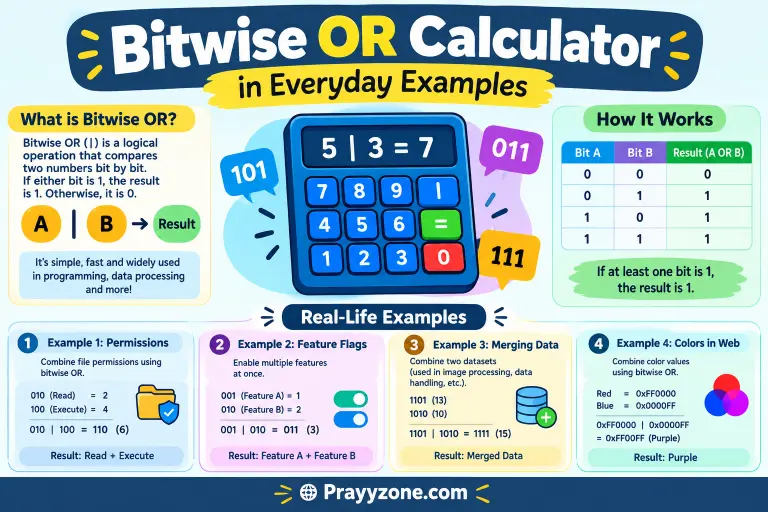
Although bitwise OR is mainly a programming concept, it appears in many practical tasks.
In Emails
A technical email might say:
“I used a bitwise OR calculator to check the mask before adding it to the program.”
This is useful when developers need to verify binary values.
In News
A technology article might explain how programmers use bitwise operations when working with computer systems, hardware, or software.
On Social Media
A programmer may write:
“The bitwise OR result is 15.”
This can help explain a coding problem or programming lesson.
In Formal Writing
A formal technical sentence could be:
“The bitwise OR operation sets a result bit when at least one corresponding input bit is set.”
This describes the basic operation clearly.
Bitwise OR is also useful for combining flags and setting selected bits.
Bitwise OR Calculator – Google Trends & Usage Data
The search phrase “bitwise or calculator” is a specialized technical query. It is much narrower than general terms such as “calculator” or “binary calculator.”
Interest usually comes from people working in:
- Programming
- Computer science
- Digital electronics
- Binary mathematics
- Software development
- Coding education
- Computer engineering
Online tools show that users may want to enter decimal, binary, hexadecimal, or octal values and receive the OR result. Several current calculator tools provide this type of functionality.
Google Trends popularity for such a specific phrase can also be low or fluctuate by country because the total search volume is much smaller than broad calculator keywords. Exact Trends numbers should be checked directly in Google Trends for the desired date range and country rather than treated as permanent statistics.
Keyword Variations Comparison
| Keyword variation | Main intent | Best use |
| bitwise or calculator | Calculate bitwise OR | Main content keyword |
| bitwise OR calculator | Calculate OR between integers | Technical content |
| binary OR calculator | OR binary numbers | Binary-focused users |
| OR calculator | Calculate OR | Broader search |
| bitwise calculator | Multiple bitwise operations | General programming |
| bitwise OR operation | Learn the concept | Educational content |
| binary bitwise OR | Understand binary OR | Computer science |
The exact phrase bitwise OR calculator is usually the clearest description of the tool.
FAQs About Bitwise OR Calculator
1. What is a bitwise OR calculator?
A bitwise OR calculator compares the matching bits of two numbers and returns 1 when either bit is 1.
2. What symbol is used for bitwise OR?
The common symbol is the single pipe:
|
3. What is 5 OR 3?
In binary:
0101
0011
—-
0111
Therefore, 5 OR 3 = 7.
4. Is bitwise OR the same as logical OR?
No. Bitwise OR works on individual bits. Logical OR usually works with logical conditions and returns a Boolean result.
5. What is the difference between OR and XOR?
OR returns 1 when one or both bits are 1. XOR returns 1 only when the two bits are different.
6. Can a bitwise OR calculator use hexadecimal numbers?
Yes. Many online tools support hexadecimal, decimal, binary, and octal inputs.
7. Why do programmers use bitwise OR?
Programmers use OR to set bits, combine flags, and work with low-level data.
Conclusion
A bitwise or calculator is a useful tool for anyone working with binary numbers and programming. It removes the need to compare every bit by hand and can make technical calculations faster and easier.
The key rule is simple: bitwise OR produces 1 when either corresponding bit is 1. It produces 0 only when both bits are 0. The standard operator is |.
For example, 5 | 3 gives 7 because 0101 | 0011 produces 0111. Bitwise OR is different from AND and XOR, so knowing the correct operator is important.
There is also no British-versus-American spelling problem with this keyword. Bitwise OR calculator works for US, UK, Commonwealth, and global audiences. If you are writing for content, keep the exact keyword in the title, headings, and useful parts of the article without repeating it too often.
if you are a student, programmer, or computer science learner, a bitwise OR calculator can help you check results and understand binary operations more easily.